

Cull with AI, then batch retouch in the same app
Blurred frames and closed eyes get filtered out first.
- 20% off every plugin
- Free Cloud Retouch credits included
- Results on layers, original untouched
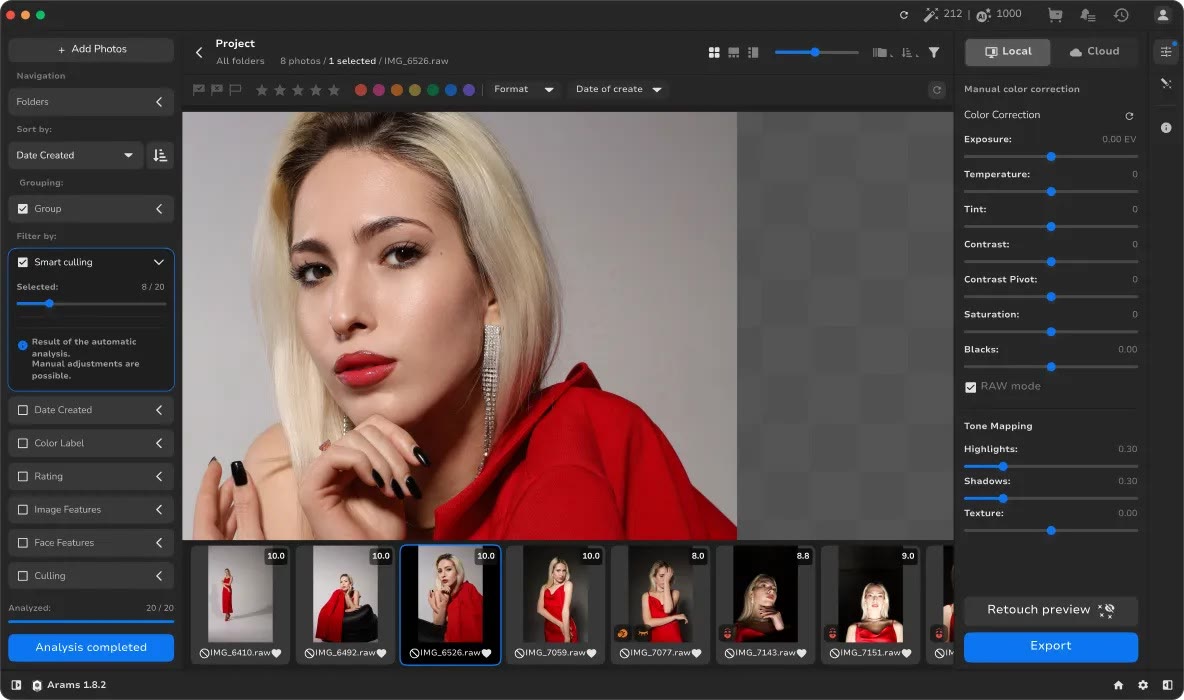
A shoot leaves thousands of RAW files behind. Arams analyses them and filters out technical flaws such as blur, closed eyes and underexposure. When a scene has many near-identical frames it picks the strongest, and the final decision always stays with the photographer.
The Smart culling filter lets you set how many photos you want to keep. The screenshot shows 8 of 20 selected, with scored thumbnails you can override by hand. Review tools for face navigation, search by filename and tagging come with it.
After the selection you stay in the same window. Do colour work with exposure, temperature, contrast, tone mapping and curves, then run Retouch4me retouching in batch. Masking tools are included, and export covers JPEG, PNG, TIFF and layered TIFF.
Local and Cloud processing are both available, and new users get 20 free culling credits. The app itself downloads free. If you plan to add retouching plugins later, check how the 20% discount fits in.
Deals you can use now
| Deal | Code | Conditions |
|---|---|---|
| 20%20% off every plugin | — | Comes with free Cloud Retouch credits |
 See Retouch4me in detailPhotoshop plugins that retouch portraits for youBefore and after, side by side · A few clicks inside Photoshop · Original untouched, results on layers · Clean skin that still looks real
FAQ
What kinds of flaws does it catch?
Blur, closed eyes, underexposure and similar technical problems. You still decide which frames stay.
Which formats can I export?
JPEG, PNG, TIFF and layered TIFF.
Does it cost anything to try?
Arams is free to download, and new users receive 20 free culling credits.
You might also like
 UniConverter15% off every licenceConvert, compress and record in one video toolbox
 FilmoraTwo-week free trialThe video editor where AI handles the tedious part
 Media.ioHalf price on the yearly planAn AI image and video studio in your browser
 InVideo30% off InVideo Studio monthlyTurn one prompt into a finished video