
Colour and shot framing filters
Stack conditions and shrink the shortlist fast.
- 20% off Plus and Pro with GET20
- Save 20% on annual billing
- 600 or 1200 credits a month
Works on Plus and Pro subscriptions.
Get the discount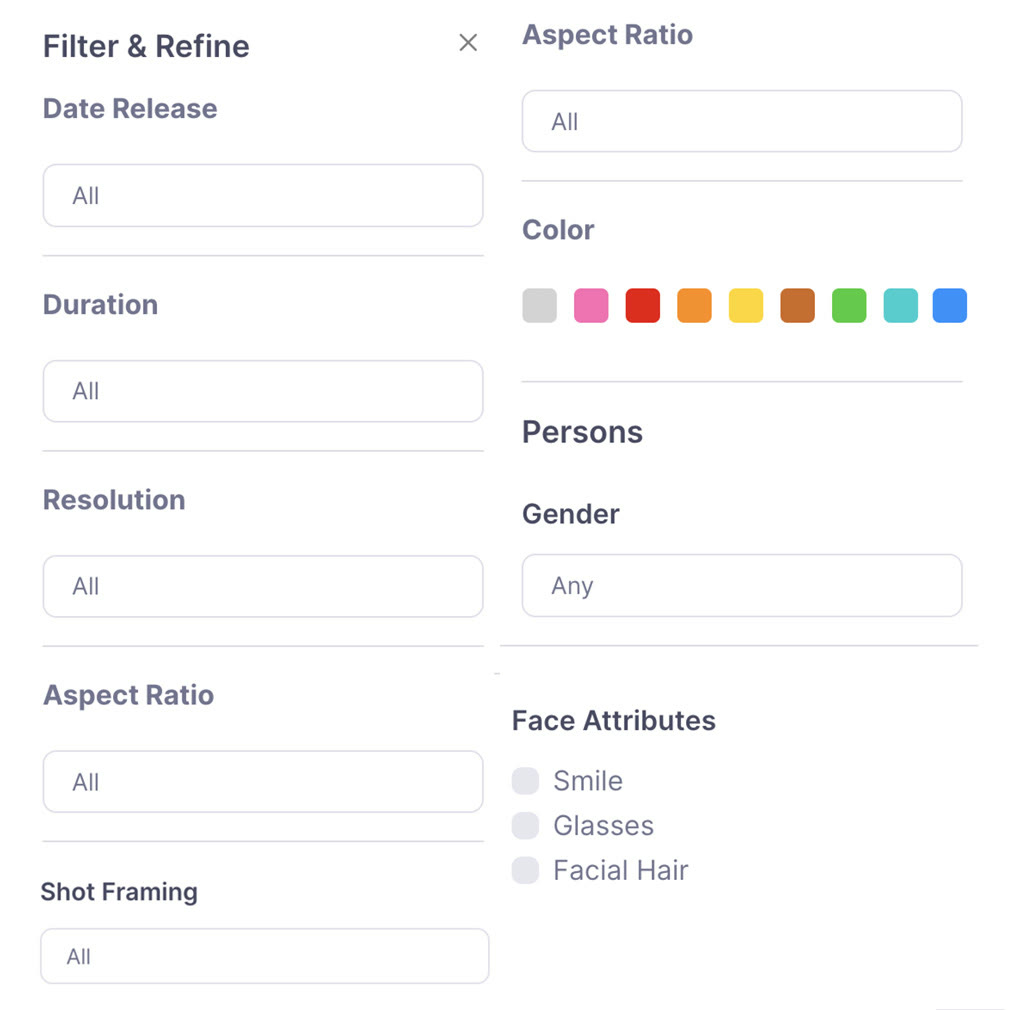
When a search returns hundreds of results, light and composition are the first things to sift. The Filter & Refine panel starts with release date, duration, resolution and aspect ratio.
The colour filter offers nine swatches: grey, pink, red, orange, yellow, brown, green, teal and blue. It is most useful when a pitch has a fixed palette, such as sunset tones or neon.
Shot framing lets you ask for close-ups or wides, and for vertical work you can fix the aspect ratio first. Scenes with people can be narrowed by gender and by smile, glasses or facial hair.
Filters run across the whole reference database, and Plus and Pro use that same database. You may as well start with GET10 or GET20 already lowering the subscription.
Deals you can use now
| Deal | Code | Conditions |
|---|---|---|
| 20%20% off Plus and Pro subscriptions | GET20 | Works on Plus and Pro subscriptions. |
| 10%10% off Plus and Pro subscriptions | GET10 | Covers both the Plus and the Pro plan. |
| 20%Save 20% on annual billing | — | Applies to Plus and Pro annual subscriptions, shown under the annual option on the pricing page. |
 See Refsee in detailFind film and ad references by sceneAds, movies, titles and voice in one search · Filter by colour, ratio and shot framing · Collect frames into a moodboard · Cut the exact moment into a GIF
FAQ
Which filters are there?
Release date, duration, resolution, aspect ratio, shot framing, colour, and gender plus face attributes for people.
How many colours can I pick from?
The panel shows nine colour swatches.
Can filters be combined?
Yes, choose several at once to narrow results further.
You might also like
 EdrawMaxBundle price when EdrawMax is paired with EdrawMind or EdrawProjDesktop diagram maker with 210 diagram types
 VectorStockFree vectors section, plus plans from $9.99 a monthRoyalty-free vectors, free picks included
 PDFelement20% off PDFelementEdit a PDF as easily as a Word file
 Edraw.AI7-day unlimited free trialDescribe it, and the diagram draws itself