
Keeper Security
Create a strong password in one click
Stop memorizing. Generate it and let the vault remember.
- 30-day free trial of paid plans
- Free plan: 1 mobile device, 10 records
- Family plan: five private vaults
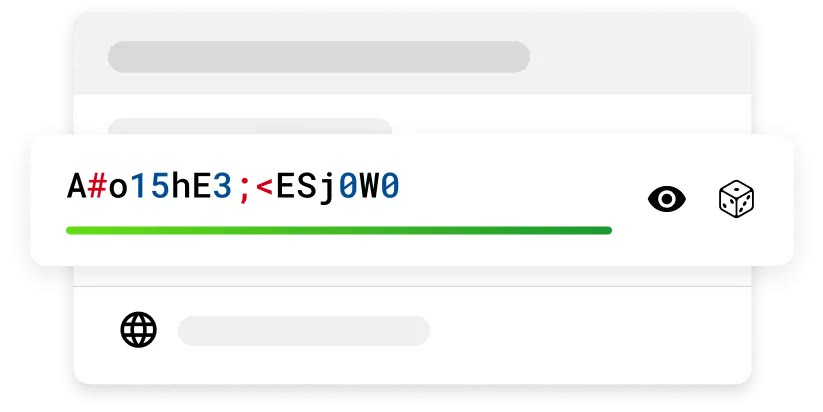
Reusing one password across sites means a single leak can open several accounts. Keeper's generator exists to hand each site its own long, unrelated value.
The screen shows a string of mixed case letters, digits and symbols with a green strength bar below. Because the vault does the remembering, a long and awkward value costs you nothing.
Beyond passwords it can also build passphrases made of several words. You adjust the complexity yourself, and anything you generated recently stays available in the generator history.
Save the new password as a vault record and it is stored alongside the username. At the next sign-in, KeeperFill takes care of typing it.
Rotating a pile of old passwords is a good job for the 30-day free trial window.
Deals you can use now
| Deal | Code | Conditions |
|---|---|---|
| 30-day trialTry Keeper's personal and family plans free for 30 days | — | After the trial you pick between Unlimited for one person and Family for five. A separate Free plan also exists, limited to one mobile device and ten records. |
 See Keeper in detailPassword manager, 30 days freeEvery login in one list · Long passwords in one tap · One record per account · A login form that fills itself
FAQ
Where does a generated password get saved?
Save it to a vault record together with the username. It is encrypted and opens on any device where you use Keeper.
How do I know it is strong enough?
The bar beneath the password field shows whether the current value is weak or strong.
What if I lose a password I just generated?
The generator keeps a history of recently created passwords and passphrases that you can look back through.
You might also like
 2ndNumber20% off yearly plans with code GIVEME20A US or UK number, no SIM needed
 FamiSafeAn extra code you add at checkoutParental controls kids know about
 hidemy.name VPNTry hidemy.name VPN free for 24 hoursVPN for 5 devices, 24h free test
 NordVPNLong-term plan savings plus a 30-day money-back guaranteeProtect 10 devices on one VPN plan